An order arrives
Bring in the product, variation, quantity, personalization, and available ship-by date.
Bring orders from Etsy, eBay, WooCommerce, and Shopify into one queue. Start reviewed 3D prints through Bambuddy from Meldsy, keep customer choices visible, and connect filament, packing, and costs to the work.
A 3D print shop has to coordinate listings, variations, print files, filament, machines, failed prints, packing, and shipping. When those details live in separate tools, it is hard to know what to print next or what an order actually cost.
Meldsy connects the order to its sliced file and a reviewed Bambuddy print request, while keeping filament availability, production status, and material costs close to the work.
Connect the details each system handles best to give the shop one clear path through production.
Bring in the product, variation, quantity, personalization, and available ship-by date.
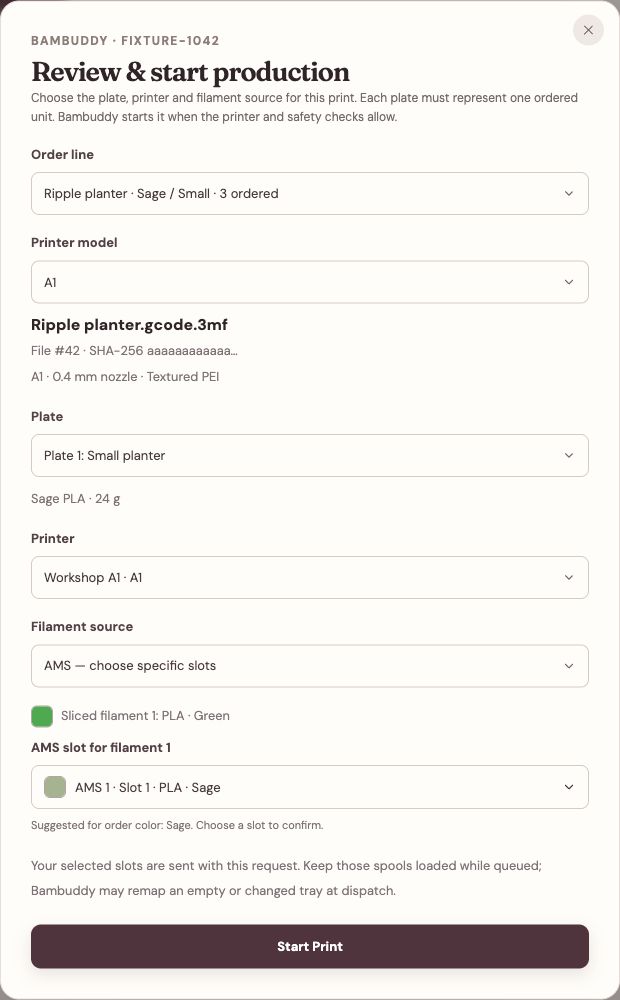
Use the listing’s linked sliced file, then choose the plate, matching printer, and filament from the order.
Confirm the build plate is clear. Bambuddy queues the reviewed print and starts it when its printer and safety checks allow.
Finish the order’s production and packing steps, then review filament, store fees, shipping, and other costs.
Connect your local Bambuddy bridge, then link an already-sliced file from Bambuddy’s Archives or File Manager to each listing and printer model. Use a default for all variations or a specific variation override.
Bambuddy tracks the 3D-printer side of the operation: printers, print history, spool inventory, and recorded filament consumption. Meldsy connects that information to the order that created the work.
Bambuddy is independent, self-hosted software. Meldsy provides the connection to your store orders; filament information depends on the data available in Bambuddy.
The customer experience and the shop's margin depend on everything before and after the machine runs.
See which orders need attention first using available ship-by dates and seller-defined production stages.
Keep color, size, personalization, and other buyer choices close to the print and packing workflow.
Track expected material demand alongside the boxes, labels, inserts, and other supplies needed to ship.
Bring seller-entered costs together with available store fees, shipping, and filament costs to estimate what the order earned.
Yes. Link an already-sliced Bambuddy file to the listing, open Review & print from the order, and choose the plate, matching printer, and filament. Start Print opens a separate build-plate confirmation before sending one copy to Bambuddy. See the full printing guide for setup and requirements.
No. You review the choices and confirm that the build plate is clear before each request. A queued print does not complete the store order; continue the normal production and packing workflow.
Alongside reviewed print requests, Meldsy brings Bambuddy spool inventory and completed-print history into the listing, material, and cost workflow. Compare available filament with open-order requirements and review per-item material estimates.
No. Bambuddy manages the printer side. Meldsy connects Etsy, eBay, WooCommerce, and Shopify orders to the seller-controlled production, costing, and packing workflow.
Printing depends on the Bambu Lab models and sliced files supported by Bambuddy and the local bridge. Choose an active matching-model printer and compatible loaded filament. Meldsy's other order, material, packing, and profit tools can still be useful to shops with other printers.
No. Filament is one material cost. Include available store fees, packaging, shipping, advertising, labor or machine costs entered by the seller, and other applicable costs in the estimate.
No. Bambuddy is independent, self-hosted software. Meldsy is not affiliated with or endorsed by Bambuddy, Bambu Lab, or the connected storefront platforms.
Keep orders, reviewed prints, filament, packing, and estimated profit in one connected workflow.
Start open beta →